Connect a source control provider
Setting up an SCM Connection in Plural to integrate with GitHub, GitLab, or Bitbucket
Overview
Plural can spawn pull requests, post review comments, and otherwise integrate with your standard SCM (Source Control Management) workflows. The most impactful of these features is the PR Automation API, which allows you to spawn templated pull requests to do common tasks like:
- provision new clusters
- drive deployment pipelines
- in conjunction with Stacks, provision associated Kubernetes or cloud infrastructure (databases, IAM, networks)
To get this working you'll first need to give your Plural Console scoped access tokens to your SCM.
Prerequisites
Some things you'll need to run this tutorial:
- Plural Console
adminPermissions - SCM Provider Personal Access Token
- SCM Provider Organization
adminPermissions- This is only required when creating the webhook
- The workload cluster can still be created without the SCM webhook
Create a New SCM Connection
Creating an SCM Connection is easiest using our UI. You can then reference that resource via a Kubernetes CRD to drive other workflows. Step by step, you'll want to:
- Navigate to
https://{your-console-domain}/pr/scm - Click the Create Connection Button at the Top Right
- Fill in the Required Fields
- Provider Type: The SCM Provider Hosting Git Repositories
- Name: Reference Name for the Provider
- ℹ️ NOTE: The cluster-creator PR Automation looks for
githubby default, but is arbitrary and can be changed
- ℹ️ NOTE: The cluster-creator PR Automation looks for
- Token: The Personal Access Token to use.
- Click
Create
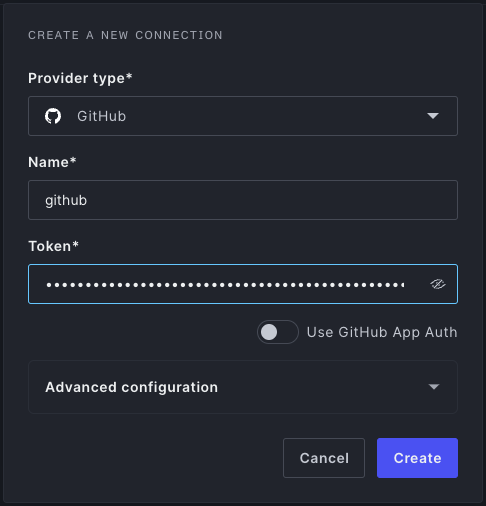
Create an ScmConnection CRD Instance
Once the connection is created in the UI, we can reference it with a CRD instance:
- ❕ Ensure the Name Provided in the UI matches the
spec.namein the CRD Exactly - An
ScmConnectionYAML template for GitHub exists inbootstrap/pr-automation/scm.yaml; you'll need to uncomment it. It should look like this:
apiVersion: deployments.plural.sh/v1alpha1
kind: ScmConnection
metadata:
  name: plural
spec:
  name: plural
  type: GITHUB
You should now be able to commit and push, and Plural will sync it in (or create a PR to merge it into your main branch):
git commit -m "setup a Plural scm connection"
git push
Add an SCM Provider Webhook
Plural listens to incoming PRs to drive a couple of workflows:
- labeling the status of spawned PRs generated by PR Automations. Without a webhook, they'll just remain OPEN perpetually.
- listening for PRs linked to stacks so we can generate
planruns for Terraform/Pulumi/etc. and post back the results as a PR comment.
If you want that functionality, add a webhook in your SCM by doing the following:
Navigate to
https://{your-console-domain}/pr/scm-webhooksClick the
Create WebhookButtonFill in the Required Fields
- Provider Type: The SCM Provider Hosting Git Repositories
- This may be obvious, but you need to select the same provider as the console webhook
- Owner: The Organization or Group Within the SCM Provider
- Secret: The Webhook Secret to Share; you can generate a cryptographically secure one with
plural crypto random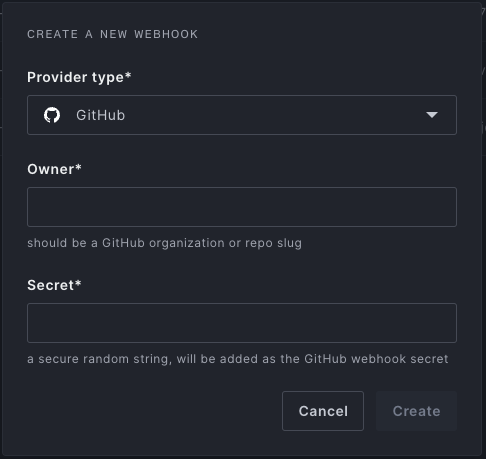
- Provider Type: The SCM Provider Hosting Git Repositories
Click
Create- Copy the Webhook URL and note the secret to use within the SCM Provider Webhook
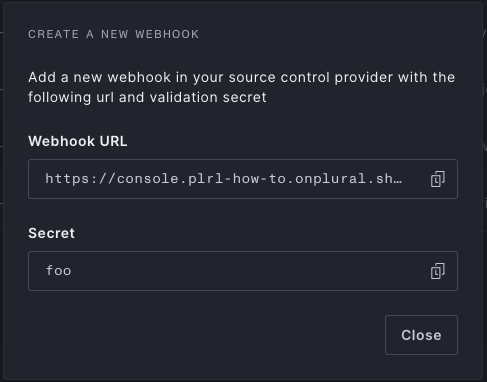
- Copy the Webhook URL and note the secret to use within the SCM Provider Webhook
Create the Webhook with the SCM Provider
You can create this webhook at whatever scope you'd prefer. Depending on the scope, the permissions needed will likely vary. A simple place to start is creating a webhook scoped to your plural up repository.
Here are some docs to help you work through the webhook creation process for several SCM providers: