PR automation custom resources
Define your own Pull Request Automations with Kubernetes CRDs
You can use our CRD toolkit to easily generate new PR Automation flows. This can be as simple as generating pull requests to upgrade to a new Kubernetes version in Terraform, or it can involve more complex workflows. In this guide, we'll show how you can use it to provide self-service developer workspaces, a common use case for many enterprises.
Defining Templates
Most of the PR automation works off of Shopify's Liquid templating engine. It's a well-documented, widely used templating library that is frankly a bit nicer than Go's built-in text/template library. Plural provides a set of custom filters that can be used in your templates. For more information, see Liquid Filters in PR Automation.
For this example, a few templates are worth mentioning.
In templates/service.yaml.liquid:
apiVersion: deployments.plural.sh/v1alpha1
kind: ServiceDeployment
metadata:
  name: {{ context.name }}
  namespace: infra
spec:
  namespace: {{ context.name }}
  git:
    folder: workspaces
    ref: main
  repositoryRef:
    kind: GitRepository
    name: infra
    namespace: infra
  configurationRef:
    name: plural-pull-creds
    namespace: infra
  helm:
    version: "0.x.x"
    chart: workloads
    valuesFiles:
    - {{ context.name }}.yaml
    repository:
      namespace: infra
      name: workloads
  clusterRef:
    kind: Cluster
    name: mgmt
    namespace: infra
and workspace.yaml.liquid:
cluster: {{ context.cluster }}
gitRepository: {{ context.repo }}

access:
  write:
    - groupName: {{ context.group }}

workloads: {{ context.workloads }}
The first generates a ServiceDeployment CRD (if you aren't familiar with this, see the docs for the Plural operator) that will ultimately create the workspace service. The second defines the Helm values file for that service. The variables in context are user-specified, and it also takes a list of workloads that will be the individual components spawned by that service -- the workspace is in fact an app-of-apps.
PR Automation Spec
Those templates are then used by a PR Automation resource like so:
apiVersion: deployments.plural.sh/v1alpha1
kind: ScmConnection
metadata:
  name: github
spec:
  name: github
  type: GITHUB
---
apiVersion: deployments.plural.sh/v1alpha1
kind: PrAutomation
metadata:
  name: workspace-creator
spec:
  name: workspace-creator
  documentation: |
    Sets up a PR to provision a new workspace for a team.  This is fairly rudimentary at the moment for demonstration purposes
  creates:
    templates:
      - source: templates/service.yaml.liquid # points to the template above
        destination: 'apps/workspaces/{{ context.name }}.yaml'
        external: false # tells us to source the template from within the repo
      - source: templates/workspace.yaml.liquid # similar as above, pointing to above templates
        destination: workspaces/{{ context.name }}.yaml
        external: false
  scmConnectionRef:
    name: github
  title: 'Adding workspace {{ context.name }} for {{ context.group }}'
  message: "Adding workspace {{ context.name }} for {{ context.group }}\nWorkloads to be provisioned: [{{ context.workloads }}]"
  identifier: pluralsh/pr-automation-demo # id slug for the repo this automation will be applied to
  configuration:
    - name: name
      type: STRING
      documentation: The name of this workspace
    - name: cluster
      type: STRING
      documentation: The cluster this workspace deploys to
    - name: repo
      type: STRING
      documentation: The repo it is sourced from
    - name: group
      type: STRING
      documentation: A group w/ writer permissions for this workspace
    - name: workloads
      type: STRING
      documentation: comma separated list of workloads
Tying this together, we've created a PR Automation that references the two YAML templates above and is configured to create new files from the results of applying each. Once the automation spec is created, it will be viewable in your Plural console under the PR tab, where you can create the PR by filling out a form like:
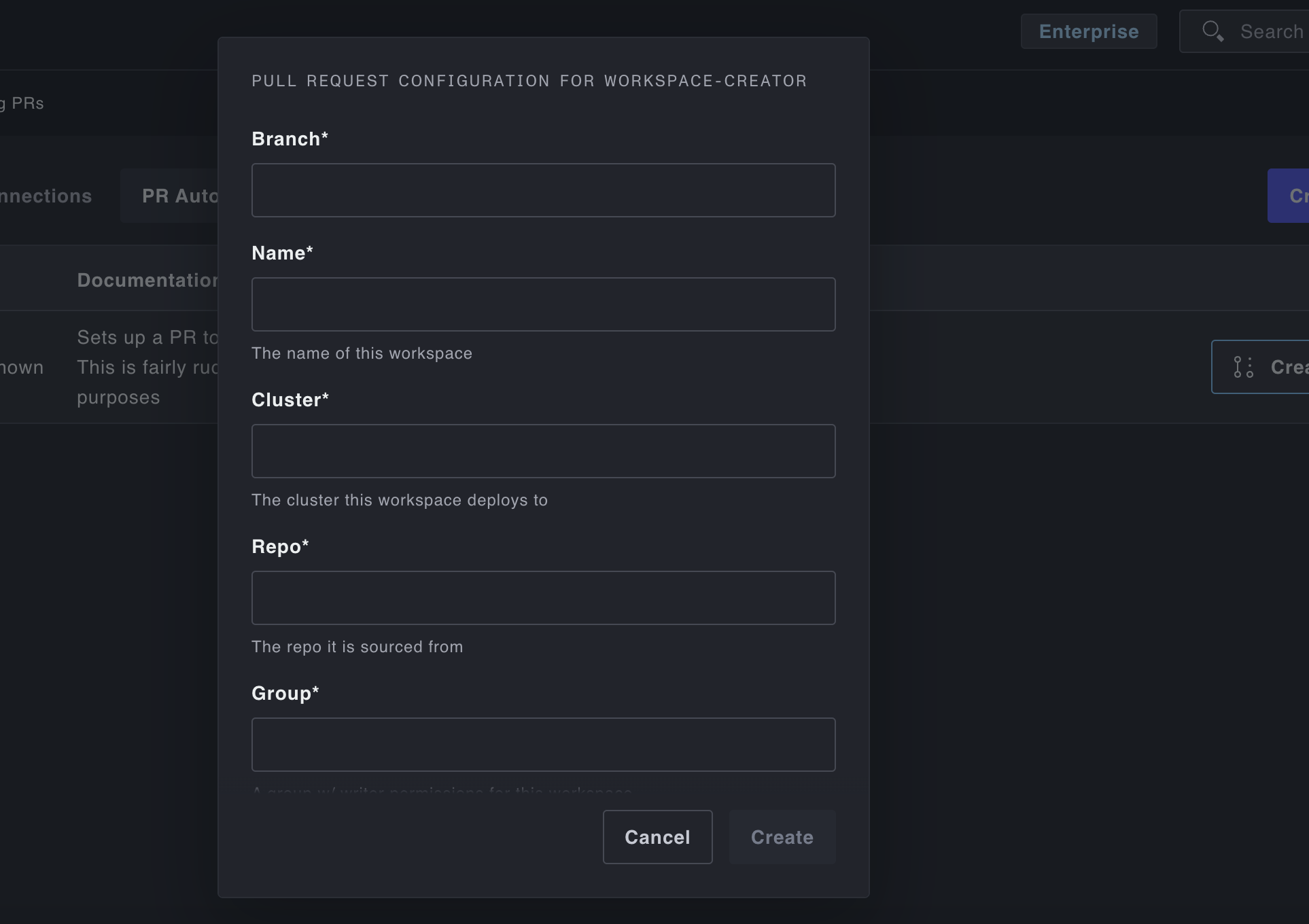
When the automation is triggered, it will take the results of that form, pass them to the templates, print them to the configured files, and call the appropriate SCM API (GitHub's in this case) to generate the pull request.
In this case, another service is already in place to sync the apps/workspaces folder, so once the pull request is merged, the system polls in the new CRD from that folder and the new workspace is provisioned.