SCM Webhooks and PR Linking for Plural Flows
Setting up SCM webhooks and automatically linking Pull Requests to Plural Flows
Overview
Plural uses SCM (Source Control Management) webhooks to monitor pull request events and integrate with your development workflow. This allows Plural Flows to automatically link associated pull requests, enabling codebase root cause investigation in response to an alert or other issue.
When a pull request is linked to a Flow, Plural automatically creates vector embeddings of the code changes for semantic search and analysis. These indexed changes can be used to identify potential root causes when alerts fire, by finding relevant code modifications that may have contributed to the issue. The vector index is securely stored and access is governed by Flow permissions, ensuring that investigations respect your existing security boundaries and that AI-assisted analysis remains within your configured authorization requirements.
Setting up SCM Webhooks
To enable features like automatic PR status labeling and linking PRs to Plural Flows, you need to configure an SCM webhook.
Prerequisites
- Plural Console
adminPermissions - SCM Provider Personal Access Token (Refer to provider documentation for creation: GitHub, GitLab, Bitbucket)
- SCM Provider Organization
adminPermissions (Required only when creating the webhook initially)
Creating the Webhook in Plural
- Navigate to
https://{your-console-domain}/pr/scm-webhooksin your Plural Console. - Click the
Create WebhookButton at the top right. - Fill in the Required Fields:
- Provider Type: Select the SCM Provider (GitHub, GitLab, Bitbucket).
- Owner: The Organization or Group within the SCM Provider.
- Secret: A shared secret for webhook verification. You can generate one using
plural crypto random.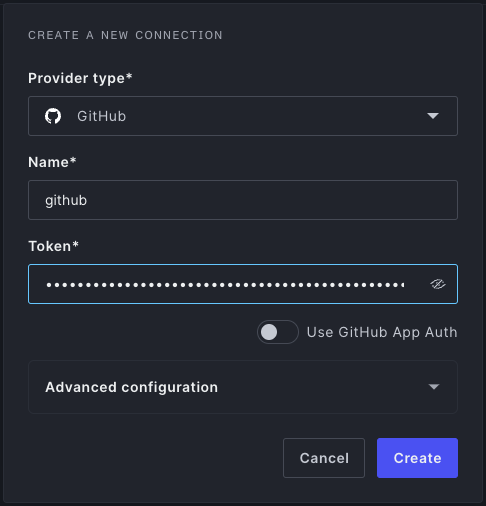
- Click
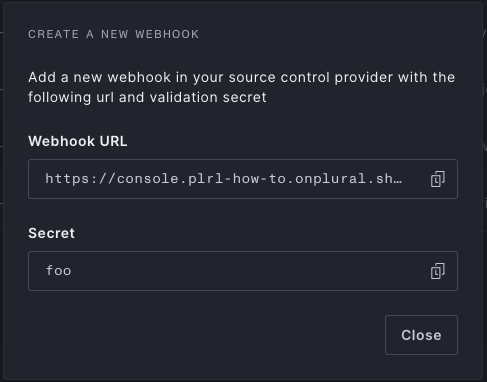
Create. - Copy the generated Webhook URL and note the secret you provided.
Configuring the Webhook in your SCM Provider
Now, use the copied Webhook URL and secret to create a webhook within your SCM provider's settings. You can typically configure this at the repository or organization/group level.
- Payload URL: Paste the Webhook URL copied from the Plural Console.
- Content type: Set to
application/json. - Secret: Enter the secret you created in the Plural Console.
- Events: Configure the webhook to trigger for Pull Request events. Ensure it includes events for opening, closing, reopening, and editing pull requests.
Refer to your SCM provider's documentation for specific instructions:
- GitHub Repository Webhooks
- GitHub Organization Webhooks
- GitLab Project Webhooks (Ensure "Pull request events" is checked)
- GitLab Group Webhooks
- Bitbucket Webhooks (Select "Pull request" > "Created", "Updated", "Merged", "Declined" triggers)
Linking Pull Requests to Plural Flows
Once the SCM webhook is correctly configured, Plural can automatically link pull requests to their corresponding Plural Flows.
To link a pull request, include the following text anywhere in the pull request body (description):
Plural Flow: {flow-name}Replace {flow-name} with the exact name of the Plural Flow you want to link the PR to.
When Plural receives the webhook event for the PR creation or update, it will parse the body, find this text, and establish the link between the PR and the specified Flow within the Plural UI. This allows you to easily navigate between a Flow and its related development work.