Upgrade Insights
How to configure and check Upgrade Insights
Cloud providers sometimes provide their own Kubernetes upgrade intelligence, which Plural can directly integrate with. In addition, especially with EKS, they have their own add-on ecosystem that users need to be aware of at Kubernetes upgrade time. The Plural operator can scrape these endpoints and aggregate them centrally in our API for single-pane-of-glass visibility, which provides a few key benefits:
- Unified dashboard to understand Kubernetes upgrade-relevant information (no switching between AWS accounts and regions)
- Aggregating that information alongside Plural's own upgrade intelligence to get a holistic upgradeability picture
- Unified understanding of what EKS Add-Ons are present and whether they are latent risks for a future upgrade
Supported providers
Currently, the following provider is supported:
- Amazon Elastic Kubernetes Service (EKS)
Configuration
Upgrade Insights can be configured using our Custom Resource Definition (CRD). This configuration allows you to provide custom credentials, which are used to access the cloud provider's API and gather relevant information. For the EKS provider, we automatically configure node-level permissions during the cluster bootstrapping process with Plural, enabling our operator to retrieve upgrade insights.
Relying on Node-Level Permissions
Alternatively, you can rely on node-level permissions via the cloud provider's assume role feature with the following configuration:
apiVersion: deployments.plural.sh/v1alpha1
kind: UpgradeInsights
metadata:
  name: eks-upgrade-insights
spec:
  distro: EKS
  clusterName: "<CLUSTER_NAME>"
  interval: 10m
You can set up the IAM permissions with Terraform using the following snippet:
resource "aws_iam_role_policy_attachment" "eks_upgrade_insights" {
  for_each   = module.eks.eks_managed_node_groups # or wherever else the node groups are defined in your terraform code
  role       = each.value.iam_role_name
  policy_arn = aws_iam_policy.eks_upgrade_insights.arn
}

resource "aws_iam_policy" "eks_upgrade_insights" {
  name_prefix = "eks-upgrade-insights"
  description = "eks upgrade insights permissions for ${var.cluster_name}"
  policy      = <<-POLICY
    {
      "Version": "2012-10-17",
      "Statement": [
        {
          "Action": [
            "eks:ListInsights",
            "eks:DescribeInsight",
            "eks:ListAddons",
            "eks:DescribeAddon"
          ],
          "Effect": "Allow",
          "Resource": "*"
        }
      ]
    }
  POLICY
}
With this approach, no advanced secret management or operator reconfiguration is necessary, making it the easiest but still secure path to setting up upgrade insights scraping.
Explicit credentials
To configure Upgrade Insights with explicit credentials, you can use the following YAML configuration:
apiVersion: v1
kind: Namespace
metadata:
  name: upgrade-insights
---
apiVersion: v1
kind: Secret
metadata:
  name: eks-credentials
  namespace: upgrade-insights
stringData:
  secretAccessKey: "<SECRET_ACCESS_KEY>"
---
apiVersion: deployments.plural.sh/v1alpha1
kind: UpgradeInsights
metadata:
  name: eks-upgrade-insights
spec:
  distro: EKS
  clusterName: "<CLUSTER_NAME>"
  interval: 10m
  credentials:
    aws:
      accessKeyID: "<ACCESS_KEY_ID>"
      region: "<REGION>"
      secretAccessKeyRef:
        name: eks-credentials
        namespace: upgrade-insights
Required permissions
Depending on the provider, a specific set of permissions is required to access the API.
EKS
The following permissions statement is required for EKS:
"Statement": [
        {
            "Action": [
                "eks:ListInsights",
                "eks:DescribeInsight",
                "eks:ListAddons",
                "eks:DescribeAddon"
            ],
            "Effect": "Allow",
            "Resource": "*"
        }
    ]
Checking generated insights
To view the cluster insights generated by the scraper, follow these steps:
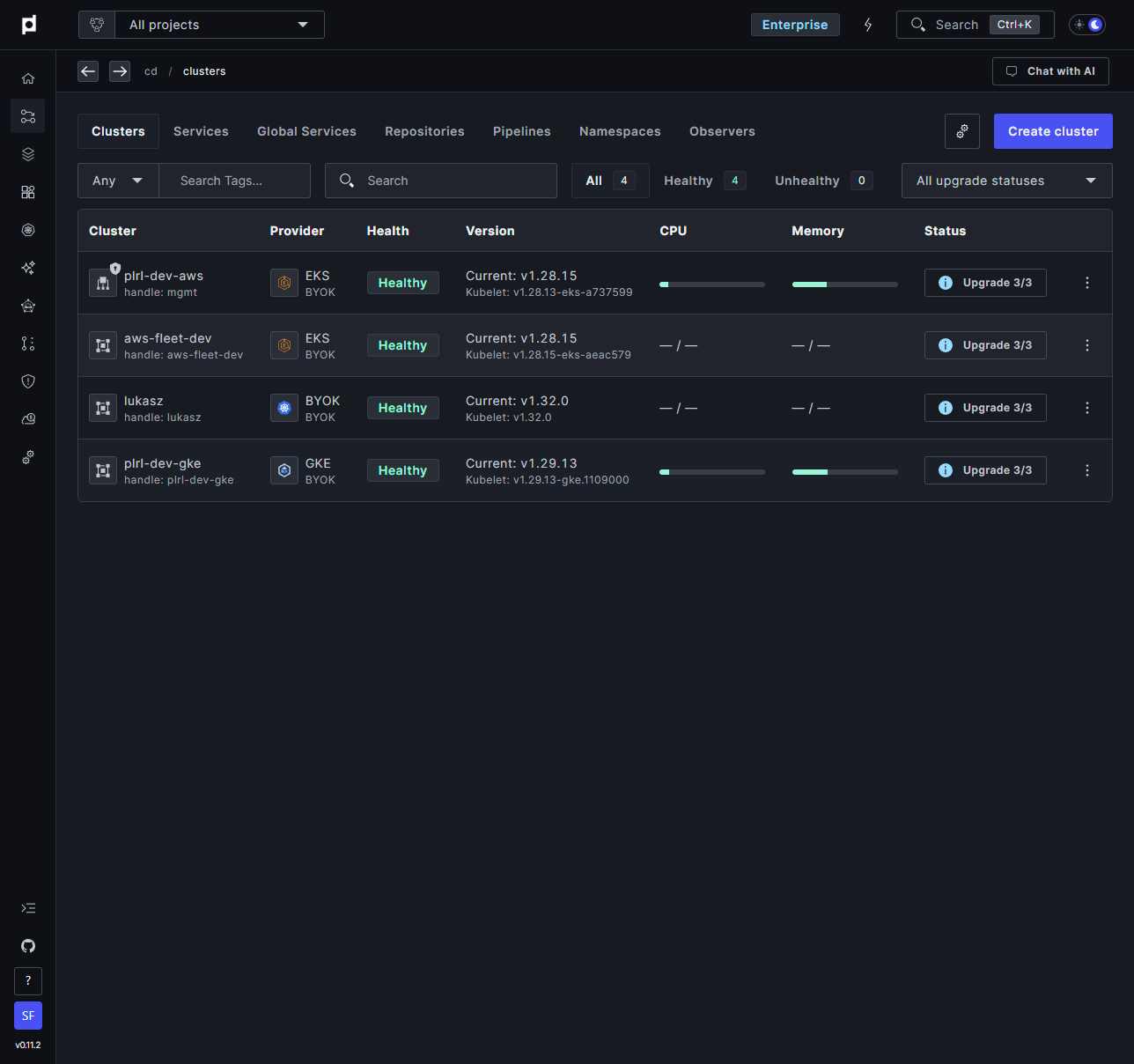
Navigate to the Clusters view in the Plural Console.
Locate the desired cluster and click the Upgrade button on the right side of the cluster's row.
In the panel that appears, open the Check API Deprecations section.
Select the Detected by Cloud Provider tab to view insights provided by the cloud provider.
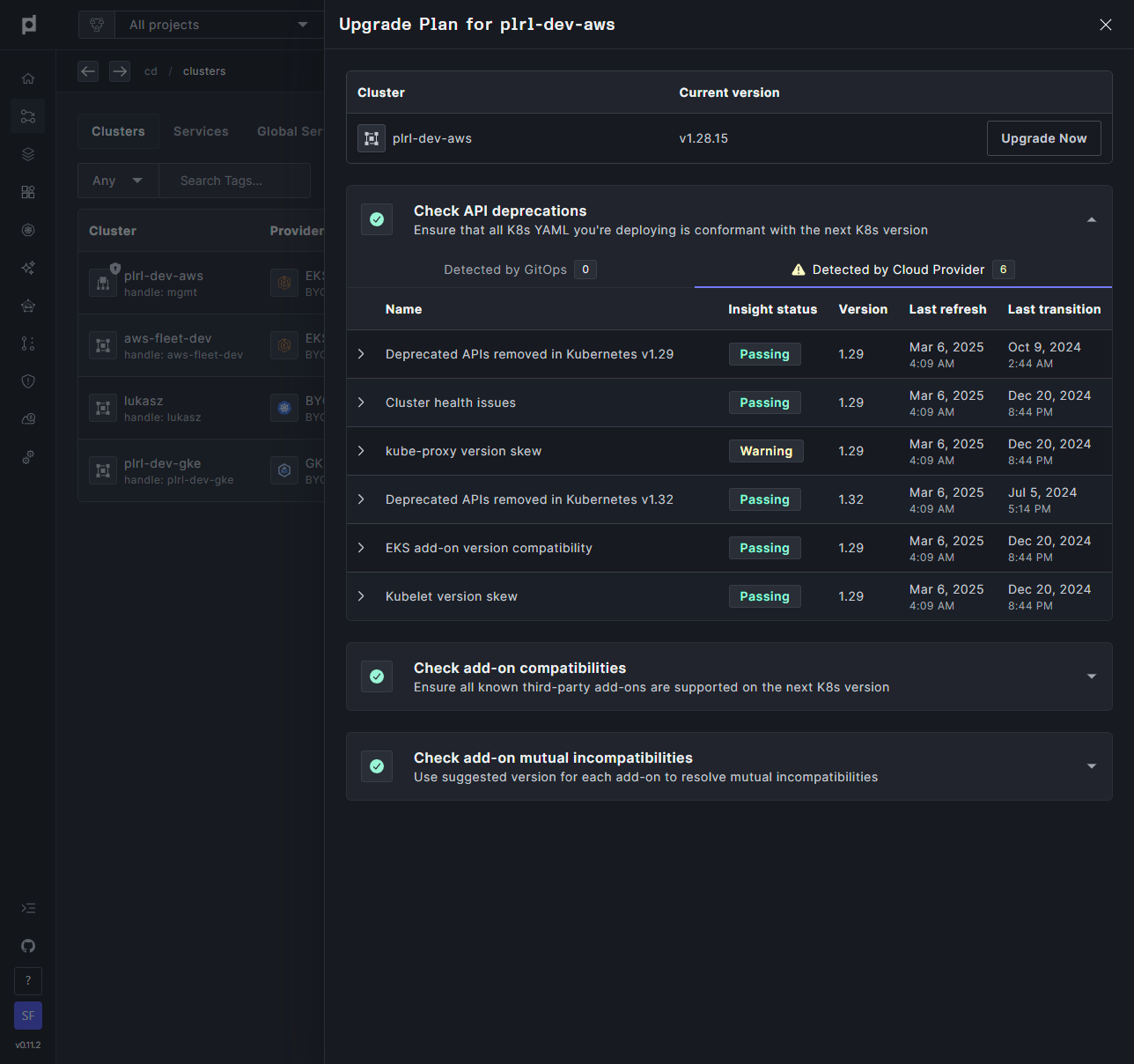
These steps take you to the insights scraped from your cluster, presented in a clear and accessible format within the Plural Console.