Set Up and Configure Plural AI
Configure Plural AI and mix models to optimize cost and performance
The current state of generative AI is a sprawl of vendors offering products with different specialties and price points, and an optimal AI setup commonly uses models from multiple vendors or multiple models from the same vendor. Plural provides several knobs designed to make that degree of customization seamless and compatible with a GitOps workflow.
Set Up Plural AI
Plural AI can be configured through Settings → AI settings in the Plural Console or with the DeploymentSettings CRD. If you installed Plural with plural up, the resource is already defined at bootstrap/settings.yaml.
For a basic OpenAI configuration, create a credential secret and reference it from DeploymentSettings:
apiVersion: v1
kind: Secret
metadata:
  name: ai-config
  namespace: plrl-deploy-operator
stringData:
  openai: <access-token>
---
apiVersion: deployments.plural.sh/v1alpha1
kind: DeploymentSettings
metadata:
  name: global
  namespace: plrl-deploy-operator
spec:
  ai:
    enabled: true
    provider: OPENAI
    openAI:
      tokenSecretRef:
        name: ai-config
        key: openai
Provider credentials are always read from secrets in the plrl-deploy-operator namespace. Use additional keys in the same secret when configuring other providers:
apiVersion: v1
kind: Secret
metadata:
  name: ai-config
  namespace: plrl-deploy-operator
stringData:
  openai: <access-token>
  anthropic: <access-token>
  azure: <access-token>
  vertex: <service-account-json>
The full DeploymentSettings schema is available in the Management API reference.
Provider Selection within Plural AI
There are three main use cases where we can differentiate models:
- High-volume insight inference - a smaller, cheaper model is usually the right choice here (gpt-4.1-mini, for instance)
- On-demand agentic tool calling - this is used in Plural AI chat, PR generation, and similar features within the platform. Here you will very likely want a capable model like Anthropic Claude Sonnet 4.5.
- Embedding - Plural also consistently vector-embeds your infra data derived from GitOps and data scraping. You may need to configure a dedicated embedding model provider if the base provider doesn't support embeddings.
Tuning each of these individually often gives you the best cost/feature tradeoff for your use case.
Configure Models in the Console
You can configure the same multi-provider setup from the Plural Console:
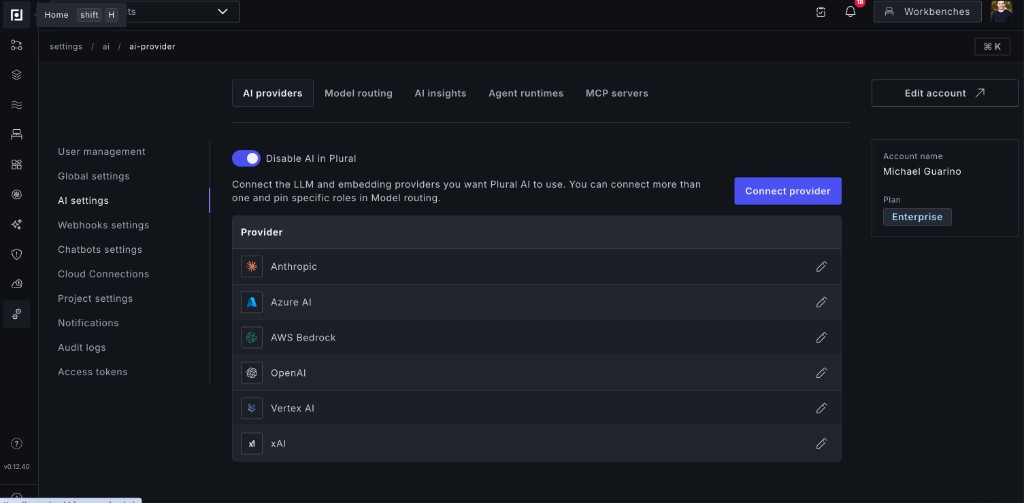
- Go to Settings → AI settings.
- Open the AI providers tab.
- Click Connect provider, select a provider, and enter its credentials and model configuration.
- Repeat for each LLM or embedding provider you want Plural to use. Use the edit button beside an existing provider to change its configuration.
After connecting your providers, open the Model routing tab. Select the provider Plural should use for each role:
- Chat model for low-compute chat and completion use cases.
- Embedding model for indexing Kubernetes and IaC state for semantic search.
- Tool model for complex agentic inference and tool calling.
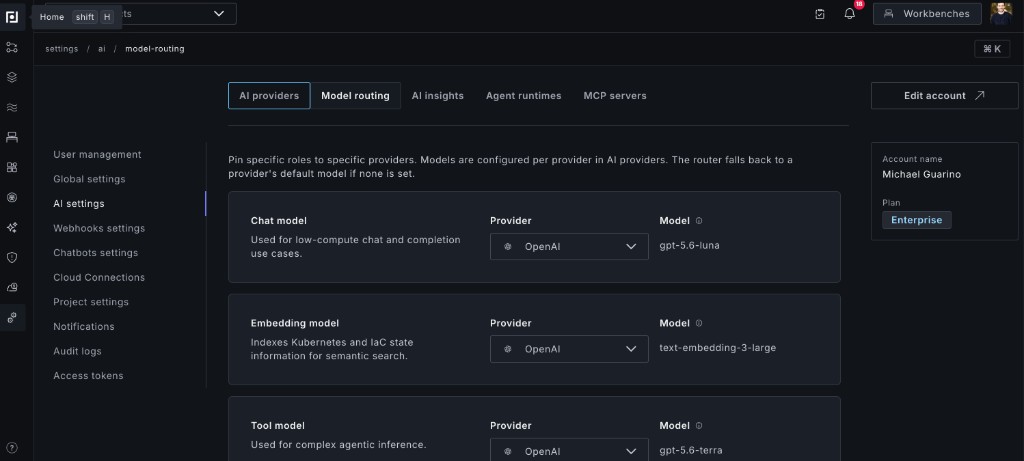
Models are configured on each provider in the AI providers tab. Model routing pins a provider to each role and displays the model that role will use. If a role-specific model is not configured, the router falls back to that provider's default model.
Configure Multiple Providers with DeploymentSettings
The recommended way to tune your AI configuration is within a GitOps workflow using our DeploymentSettings Kubernetes CRD. If you set up Plural with plural up, this is already defined for you at bootstrap/settings.yaml. Here's a nearly complete example of how to configure its AI model settings:
apiVersion: deployments.plural.sh/v1alpha1
kind: DeploymentSettings
metadata:
  name: global
  namespace: plrl-deploy-operator # this namespace is required
spec:
  ai:
    enabled: true
    provider: OPENAI # OPENAI gpt-4.1-mini for low-cost, high-volume
    embeddingProvider: OPENAI # openai has an embedding model built-in
    toolProvider: ANTHROPIC # anthropic for complex tool calling

    # example configurations of the various different AI providers supported, its not necessary to
    # configure all of them
    anthropic:
      model: claude-sonnet-4-5
      tokenSecretRef:
        name: ai-config
        key: anthropic

    openAI:
      tokenSecretRef:
        name: ai-config
        key: openai
      model: gpt-4.1-mini
      toolModel: gpt-4.1

    azure:
      tokenSecretRef:
        name: ai-config
        key: azure
      endpoint: https://plural-openai.openai.azure.com/openai/deployments
      apiVersion: '2024-10-21'

    vertex:
      project: pluralsh-test-384515
      location: us-east5
      model: anthropic/claude-sonnet-4-5
      serviceAccountJsonSecretRef:
        name: ai-config
        key: vertex
Model Selection Logic
Model selection generally follows a waterfall like this:
- For a use-case demanding a tool-capable model:
| provider | tool model | default model |
|---|---|---|
| tool | yes | n/a |
| tool | no | yes |
| default | yes | n/a |
| default | no | yes |
For a high-volume use case, the tool provider is ignored, and only the default provider rows of the table above apply.
For embedding model selection, the logic is:
| provider | embedding model | default model |
|---|---|---|
| embedding | yes | n/a |
| embedding | no | yes |
| default | yes | n/a |
| default | no | yes |
(so very similar to the tool provider use-case)
Recommendations
We've found decent success with the following combinations:
For OpenAI:
- Any OpenAI model above gpt-4.1-mini works, but a tuned setup would choose gpt-4.1 or above for tools, and gpt-4.1-mini for the default
- For embeddings, we default to
text-embedding-3-large
For Vertex AI:
gemini-2.5-flashfor high-volume use cases andanthropic/claude-sonnet-4-5for tools is a realistic combo.- You can use OpenAI as your embedding provider, or any of the Vertex embedding models.
Note that Anthropic has no embedding model, so you'll always have to mix providers. This is a decent setup:
- Configure
claude-sonnet-4-5for tools (set astoolProvider) - OpenAI gpt-4.1-mini for volume, which is our default (it's cheaper than most Anthropic models) (set as
provider) - OpenAI
text-embedding-3-largeas your embedding model, which is our default and would be selected since OpenAI is the base provider.
Learn More
See the complete DeploymentSettings schema in the Management API reference.