Simulating and testing policies
Validate Rego policies with live evaluation data and automated tests
Test policies at two levels:
- Use the Plural policy simulator to evaluate an editor draft against representative or previously observed input.
- Keep Rego unit tests beside each policy in Git and run them in CI before publishing changes.
Simulate a policy in Plural
Open Security → Policies, select a policy, and open its Definition tab. The simulator appears next to the Rego editor.
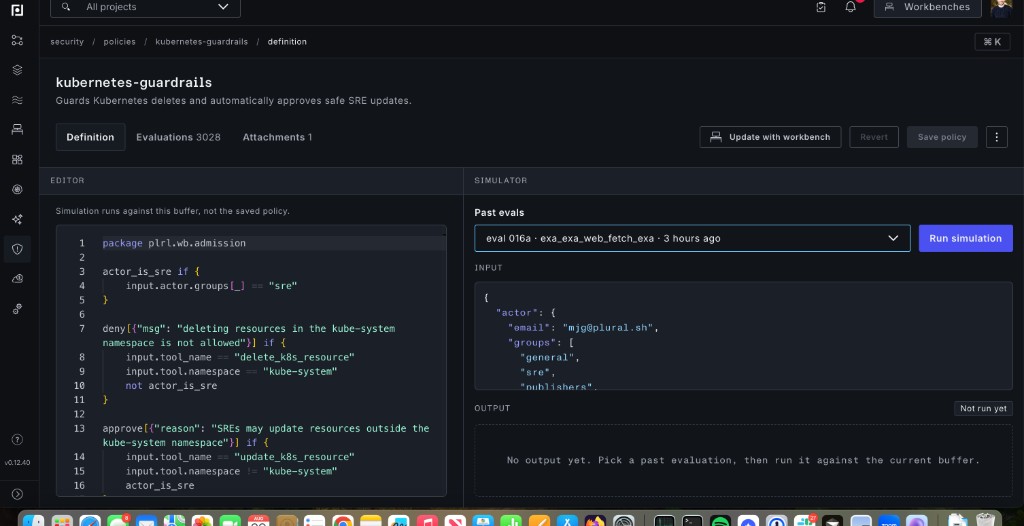
To run a simulation:
- Select an item from Past evals to load input captured from a live policy evaluation.
- Review or edit the JSON under Input.
- Update the Rego in the editor if you want to test a proposed change.
- Click Run simulation and inspect the decision and JSON under Output.
Simulations run against the current editor buffer, even when it has not been saved. This lets you validate a change before replacing the active policy.
The output depends on the policy type:
| Type | Relevant output |
|---|---|
| Workbench | deny and approve decision arrays |
| Stack | deny at run stage; deny, approve, and defer at approval |
| Binding | Boolean bind decision |
Run-stage stack policies are deny-only. An output without a denial means the run would be created. At approval, inspect the raw output when testing automatic approval: an output without a denial is allowed by the simulator, while an approve entry is what causes the stack runtime to automatically approve a run.
Test Rego in a repository
The policy examples repository uses this layout:
.
├── .github/workflows/test.yaml
├── policies/
│   ├── binding/
│   ├── stack/
│   └── workbench/
└── terraform/
    ├── main.tf
    ├── stack.tf
    ├── workbench.tf
    └── policies -> ../policies
Place tests next to their policy and name them *_test.rego. Use the same package as the policy and evaluate its rules with a supplied input:
package plrl.workbench

test_non_sre_cannot_delete_from_kube_system if {
	deny[{"msg": "deleting resources in the kube-system namespace is not allowed"}] with input as {
		"actor": {"groups": ["developers"]},
		"tool_name": "delete_k8s_resource",
		"tool": {"namespace": "kube-system"},
	}
}

test_sre_update_is_approved if {
	approve[{"reason": "SREs may update resources outside the kube-system namespace"}] with input as {
		"actor": {"groups": ["sre"]},
		"tool_name": "update_k8s_resource",
		"tool": {"namespace": "production"},
	}
}
Run formatting and tests locally with the OPA CLI:
opa fmt --fail policies
opa test --verbose policies
Run the same checks in CI:
name: Test policies

on:
  pull_request:
  push:
    branches:
      - main

jobs:
  rego:
    runs-on: ubuntu-latest
    steps:
      - uses: actions/checkout@v4
      - uses: open-policy-agent/setup-opa@v2
        with:
          version: latest
      - run: opa fmt --fail policies
      - run: opa test --verbose policies
Include positive, negative, and undecided cases. For stack policies, cover destructive and replacement actions as well as missing before or after objects. For workbench policies, test relevant actor groups, tool names, and argument boundaries.
Publish through a Plural stack
Manage policies as code by declaring plural_policy and plural_binding_policy resources in Terraform, then deploying that directory with an InfrastructureStack:
apiVersion: deployments.plural.sh/v1alpha1
kind: InfrastructureStack
metadata:
  name: policy-management
  namespace: infra
spec:
  name: policy-management
  type: TERRAFORM
  approval: true
  manageState: true
  actor: console@plural.sh
  clusterRef:
    name: mgmt
    namespace: infra
  repositoryRef:
    name: policy-management
    namespace: infra
  git:
    ref: main
    folder: terraform
When the stack checks out only the configured Git folder, keep policy files inside that folder or symlink them into it as shown in the example repository.